
Booking Steps
The passes listed are available for you to select from to reserve your service. A Quruz representative will send you an invoice to purchase the pass then match you with an Assigned Driver before approval. Contact us if you need help booking your pass.
Step 5:
Log in/sign up. (If you're already logged in skip this step.)
Step 1.
Begin The Booking
Press book now to request service.

Step 2.
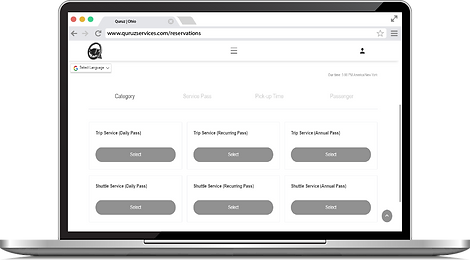
Choose Your Category
Trip Service - This pass is offered if you would rather travel to your requested destinations without another passenger in the service vehicle. (Base Rate = $2.00)
Shuttle Service - This pass is offered if you would rather travel to your requested destinations with another passenger in the service vehicle. (No Base Rate)
Delivery Service - This pass is offered if you want merchandise transported from a legal business location to a different location. (Base Rate = $4.00)
Step 3.
Select The Pass Type
Service Pass options are available:
-
Daily Pass - A driver can be presented to complete your plan within 10 minutes - 365 days after purchasing any of the displayed memberships.
-
Recurring Pass - A driver can be presented to complete 7 - 62 plans within 7 - 31 consecutive days after purchasing any of the displayed memberships.
-
Annual Pass - A driver can be presented to complete 3 - 14 plans within 365 days after purchasing any of the displayed memberships.
Only one request could be added for Recurring and Annual Passes until your booking is accepted.

Step 4.
Set Your Pick-up Time
Schedule the time and date that you want your plan to begin.

Step 5.
Login/Sign up
Log in/sign up. (If you're already logged in skip this step.)

Step 6.
Set Your Request
Fill in your full information then press "Confirm Booking" to complete your Trip Service/Shuttle Service Form.
-
The available driver will complete Round Trips and plans with two destinations if your pass includes it.
-
Contact us if you want to add Round Trips or extra destinations for a later time.
(Please Read: Set Rate Policy)

Step 7.
Wait For Approval
Before your booking is assigned to your designated driver, a Quruz representative will send you an invoice to pay for the pass after reviewing the request. (Triple check your information before submitting for clarity.)
-
The recurring and annual plans will get a membership attached to it upon approval.
-
Additional destinations and round trips are only active for 24 hours.
